

Sanid on every page
Ask “What did you find?” about the open page; it answers from the page’s own figures.
Sanid Advanced Reports read your books and tell you what every number means: 59+ reports and analyses for one company or a group in different currencies, read-only from QuickBooks Desktop, QuickBooks Online, Zoho Books or Odoo.
The same menu as the app. Pick a section, then a number on the screen.
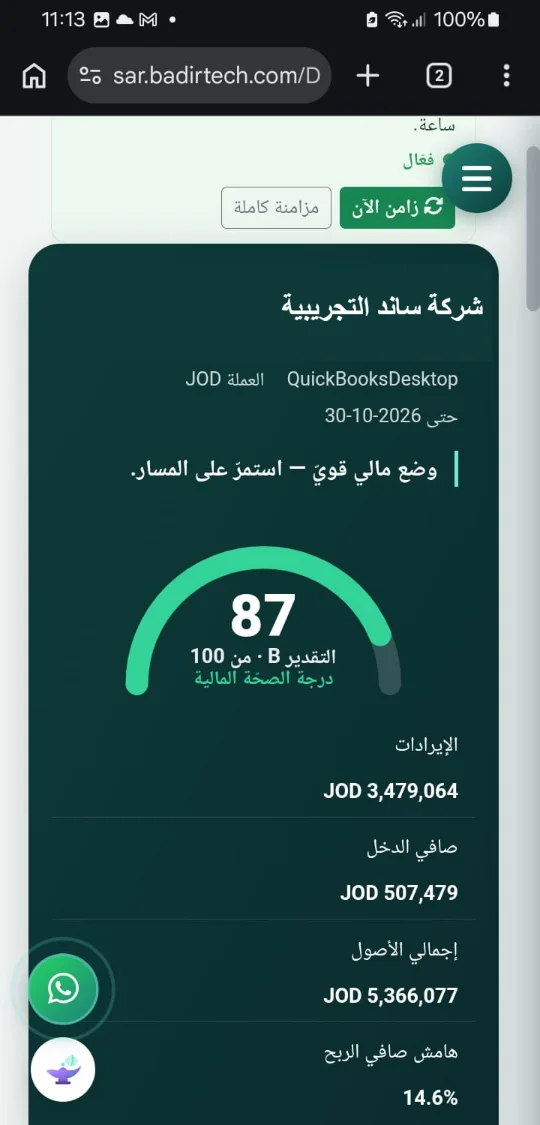
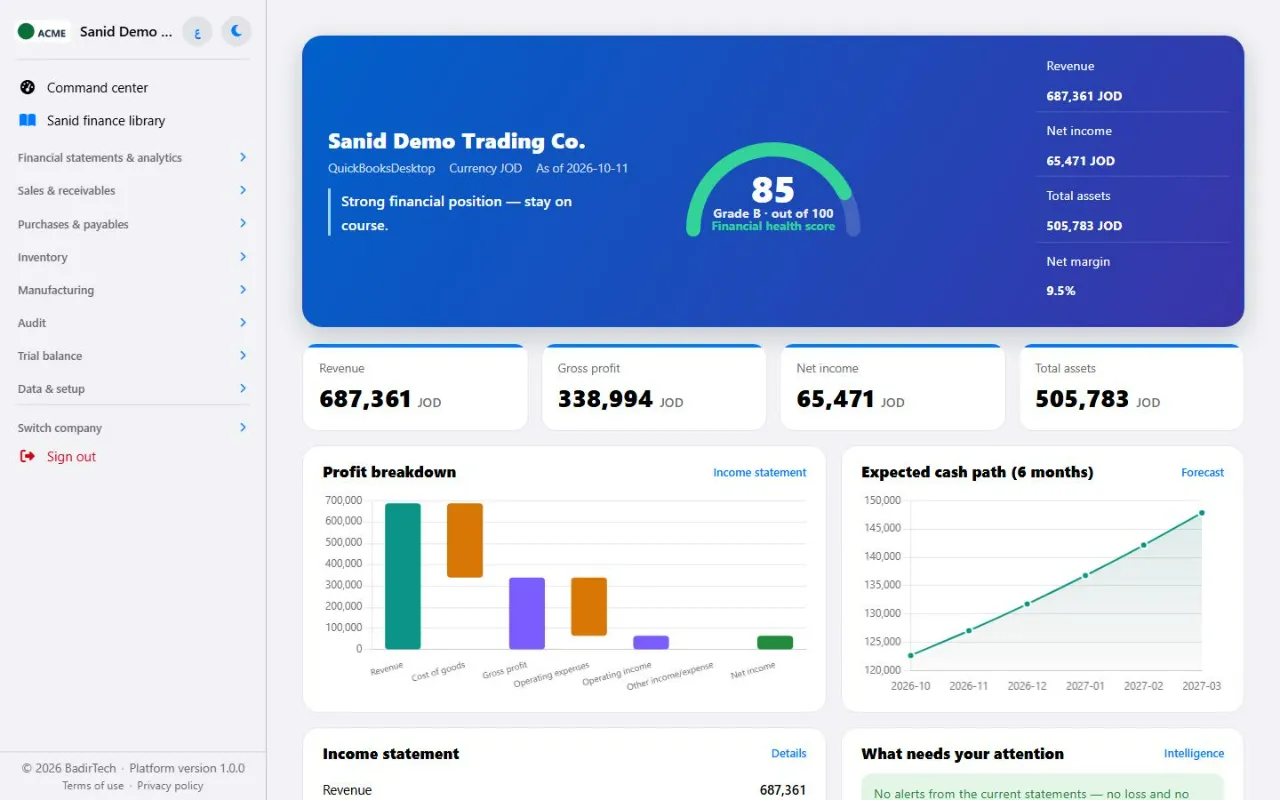
Sales, profit, cash, receivables, stock and alerts on one page; every figure opens its report.
Ask in Arabic or English; the app computes the answer from your books, with no AI and no data sent out.
The statements, ratios and trends, and why a figure changed.
Who sells what, who has paid, and what is still outstanding.
Every bill and vendor credit, with tax, by supplier and period.
What moves, what sleeps, and what your stock is worth, by WAC or FIFO.
The factory on one screen, then plans, actuals and recipe variances.
Six tests on one page, ranked by the amount affected, each with its reason and next step.
Balances at any date, with movements, and consolidated for a group.
Many companies on different systems, users and roles, groups and currencies.
Screens shown in English. The app works fully in Arabic and English, on desktop and phone.
What the platform gives you around the reports.
Ask “What did you find?” about the open page; it answers from the page’s own figures.
QuickBooks Desktop, QuickBooks Online, Zoho Books and Odoo in one account.
A currency per company, and consolidated statements translated under IAS 21.
A separate database per client, read-only link, roles and an audit log.
Every report exports as you see it; OData feed for Power BI.
Interface and reports in both languages, on desktop, iPad and phone.
We don’t ask you to trust the word “secure”. We tell you what we do with your data, what we don’t, and how you can check it yourself.
Sanid reads from QuickBooks, Zoho and Odoo and never writes to them. No adding, no editing, no deleting. Your books stay exactly as they are.
Your company’s data is kept apart from every other company. Nobody shares it with you.
Every connection is encrypted, and so are your data, the links to your systems and the backups.
Permissions for each employee and each group of reports, and sign-in with your company’s Microsoft or Google account.
Every sign-in and every change to your team and its permissions is recorded, and you can export it. Any access by our support team shows there too.
Sanid answers most questions inside the platform. External AI is your choice: turn it off, or use your own key with the provider you trust.
The auditor looks for risk, the owner for the decision, the factory manager for the reason behind the cost. This is how each of them sees Sanid when it works on top of QuickBooks, Zoho or Odoo, read-only and without touching the books.
Khaled Mahmoud
CFO of a group of four companies
The first week of every month went on gathering numbers from four systems. Now the month starts with analysis.
Actual against budget, the comparison with last year and the variances are ready for each company and for the group. And in the board meeting I answer “what if raw materials rise 10% and sales fall 15%?” in the same meeting.
My team builds its own Power BI dashboards with read-only keys, and single sign-on through Microsoft Entra was IT’s condition. Sanid answers the managers from the same calculated figures, so there are never two versions of the truth.
What he gainedA faster month-end close, live scenarios in the meeting, and one source for the numbers.
Rami Youssef
Partner at an audit firm
The first thing I look for is an entry changed in a closed month. QuickBooks doesn’t show it; Sanid puts it in front of me.
I used to export the general ledger and spend two days building journal-entry tests. In the Audit Center I found them ready, following ISA 240, with Benford and period cut-off, and every line opens its documents so I pick my sample from them.
What he gainedFewer days of preparation, risk-based samples, and a read-only connection nobody questions.
Samer Ibrahim
Owner of two trading and distribution companies
I’m not an accountant. I ask Sanid from my phone: how much did we sell this month compared with last year? It gives me the number and the reason.
The cash forecast tells me when each customer will pay, based on their actual habit, so I knew early that a tight week was ahead and postponed a big purchase. And my two companies, one on QuickBooks and the other on Zoho, I see on one dashboard.
What he gainedDecisions without waiting for the accountant, and cash managed before the crisis.
Lina Abdullah
Head of accounts at a food company
I was afraid of a reporting tool that wouldn’t match QuickBooks. Here the open receivables matched to the last fils.
The manager clicks “Explain this number” on operating expenses, sees the largest accounts and then their entries, and doesn’t call me to ask. In inventory I choose weighted average or FIFO, and I see the surpluses and the shortages each on its own, not a net figure that hides the differences.
What she gainedTrust in the numbers, fewer questions, and classification errors fixed before the close.
Dr. Nabil Abdelrahman
Tax consultant
I know in advance where the tax department might object, before the tax auditor arrives.
I define the tax rates allowed for the company, and Sanid explains every line with a rate outside them. Period cut-off reveals month-end sales that came back after it, the pricing report shows sales below cost and discounts above the limit, and consistent classification finds the expense that was capitalised by mistake.
What he gainedPre-filing review in hours instead of days.
Omar Suleiman
Production manager at a plastics factory
QuickBooks says what the order cost. Sanid says why: the material got dearer, or we used more.
Every order is compared with the standard recipe, and the monthly production audit shows the material whose use per unit went up. And the regrind clearing account whose balance nobody understood now shows with every document, by quantity and value: a real transfer, or an advance never recovered.
What he gainedThe change in cost explained, waste exposed, and buying based on the production plan.
Hala Jamil
Non-executive partner with a 30% stake
I no longer wait for the quarterly meeting to know where the company stands.
I have read-only access and see the financial statements whenever I want. Full consolidation shows the minority interest in our subsidiary and eliminates intercompany transactions, so I see the group’s real profit, not an inflated sum.
What reassures me most is that I know if a month was changed after it was closed, and who signed in and when. And the monthly reports reach me by email without signing in.
What she gainedTransparency independent of management, and oversight of what happens after the close.
30-day trial period
Fill in your details and our consultant will call you to set a time
The questions we are actually asked, and our straight answers.
Yes. It works with QuickBooks Desktop, QuickBooks Online, Zoho Books and Odoo, and reads from them only, without writing to them. Companies on different systems can sit in one account.
We didn’t stop at a promise. We built Sanid so nobody can look without you knowing:
No. Sanid never sends your accounting system a request to add, edit or delete anything. With QuickBooks Desktop it reads only when you press the refresh button, so it never slows your staff down.
No. Each company’s accounts, reports and settings are kept fully apart from every other company.
Yes. Every connection is encrypted, the links to your systems are encrypted, and your company’s data and its backups are encrypted.
Most of Sanid’s answers come from your figures inside the platform, with no outside service. When a question needs external AI:
Your data does not stay with us forever:
Yes. We have run penetration tests and full security reviews, and we review every new development for security before it reaches you.
Yes. We sign a data processing agreement with you that sets out what we do with your data, who processes it with us, when we tell you about any incident (within 72 hours), and how we delete it.
Yes. We run Sanid on your company’s own server under a private licence. The same reports, analysis and audit, and your data never leaves your network.